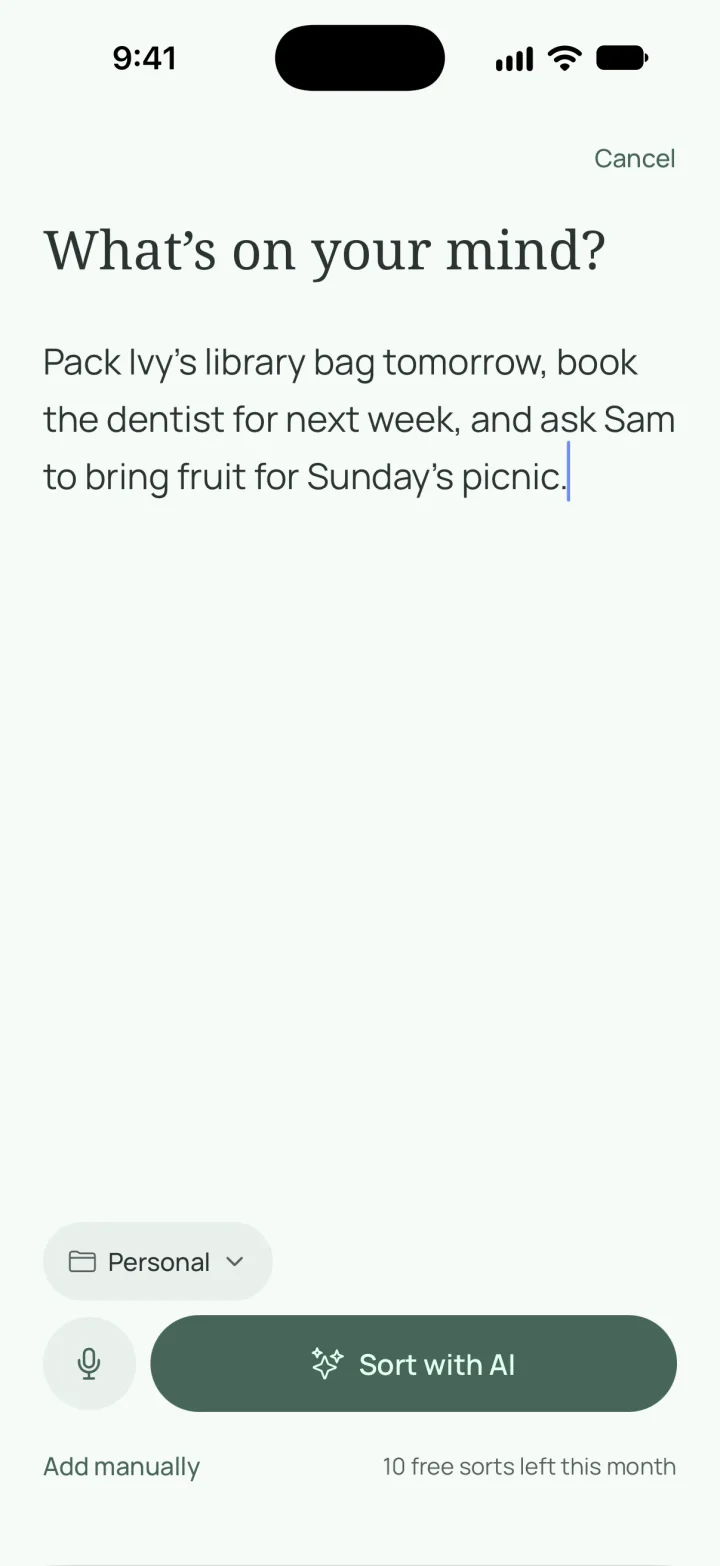
Speak or type a thought the moment it appears, whether it is a school note, errand, reminder, appointment, or household follow-up. Oria turns messy spoken context into a clear next step before it is dropped.
Published by Gracelane FamilyUpdated 22 Nov 2026iPhone (iOS 17+ widgets, iOS 18 Control Center)
What is voice and text family task capture in Oria?
Oria voice and text capture lets parents record household reminders hands-free or type a quick note from anywhere on iPhone. Oria streams live audio to ElevenLabs Scribe for transcription without storing raw audio, extracts dates, people, and notes, and saves confident tasks while holding uncertain items for review.
Capture while your hands are full
Speak a task at school drop-off or type a quick note between chores. Oria is built for the moment you remember something while already doing three other things, so you do not have to pick folders, due dates, and tags before you forget the detail.
Keep the context with the task
A voice note is more than a title. Oria keeps the extra detail attached, such as bringing the yellow borrowing folder with the library bag or calling the chemist before lunch, so a partner, grandparent, or future-you understands what actually needs to happen.
Mind Clear for a full head
When everything is rattling around at once, empty it out in one go. Oria can save confident tasks directly, while suggestions that need a second look stay available for review. You can also add tasks manually at any time without using AI sorting.
Not another noisy dashboard
Oria avoids streaks, badges, and busy productivity theatre. Voice capture is meant to reduce pressure, not turn family care into another inbox. Every captured item lands calmly on Home beside your family's scheduled activities.
How voice task capture works from lock screen to shared Space
Most reminders slip away during the gap between noticing a job and opening a calendar. Oria shortens that path to a single tap from your iPhone Home Screen, Lock Screen, Control Center, or Action Button.
Open capture in one tap. Tap the round capture button inside Oria, the pencil icon on an Oria Home Screen or Lock Screen widget (iOS 17 or later), or the iOS 18 Control Center and Action Button shortcut.
Speak naturally or type. Say one quick reminder ("Refill Nico's asthma spacer prescription before lunch tomorrow") or unload several unrelated thoughts together in one spoken note.
Live transcription without stored audio. With your permission, Oria streams microphone audio over an encrypted connection to ElevenLabs Scribe to generate live text. Oria keeps only the text transcript and never stores raw voice audio.
Automatic extraction with a review safeguard. Oria separates titles, due dates, notes, and Spaces. Confident tasks save straight to your schedule, while suggestions that need a second look wait on Home under Ready to review.
Share or hand off without rewriting. Move a captured task into a shared household Space or create a 24-hour web handoff link so a partner or helper sees the full context immediately.
Voice capture vs text entry vs manual entry
Every parent works differently, and some moments call for speaking aloud while others happen quietly after bedtime. Oria lets you switch between all three capture modes on the same screen and remembers your preference.
Capture mode
Best moment to use it
AI consent needed
Free plan monthly allowance
Voice capture
Car rides, school gates, cooking, or carrying kids
Yes (ElevenLabs Scribe + Claude)
20 voice extractions per month
Mind Clear (voice or text)
Unloading 3 to 10 tangled thoughts at once
Yes (Anthropic Claude)
10 Mind Clear AI sorts per month
Manual entry
Quiet typing, exact times, or no-AI preference
No AI call or consent required
Unlimited tasks and activities
After three deliberate manual captures, Oria automatically makes manual entry your default mode until you choose otherwise. If you reach a monthly free AI limit, capture falls back cleanly to manual entry without losing the words you typed or spoke. Oria Plus is an optional subscription on the Apple App Store for families who want expanded voice transcription and AI sorting.
Questions parents ask about voice task capture
Does Oria record or store my voice audio?
No. Oria streams microphone audio over an encrypted connection to ElevenLabs Scribe for realtime speech-to-text transcription and saves only the resulting text transcript. Oria does not store raw voice audio files, and Oria has disabled ElevenLabs' setting that uses workspace data to train models. Full details are in the Oria privacy policy.
Can I capture a family task without unlocking and hunting through menus?
Yes. On iOS 17 and later, Oria provides Home Screen and Lock Screen widgets with a one-tap Capture button. On iOS 18 and later, you can place Oria's Capture control in Control Center, on Lock Screen corner buttons, or on your iPhone Action Button to open capture straight away.
What happens if Oria mishears a date or activity during voice capture?
Your original unedited transcript is always preserved in Oria. Whenever an extracted date, recurring pattern, or activity looks ambiguous, Oria places that item in Ready to review instead of guessing silently. You can tap any date, duration, Space, or assignee chip to adjust it in seconds before adding it.
Can I use Oria if I prefer typing tasks without AI?
Yes. Manual task and activity entry is always free, unlimited, and requires no AI consent or cloud AI processing. Tap Add manually inside the capture screen to enter a task title, notes, checklist items, due date, duration, or recurring activity directly.
How does voice capture work with shared family Spaces?
Before you save or sort a voice capture, you can pick the target Space chip such as School week, Home logistics, or Weekend planning. Tasks saved into a shared Space become visible to accepted members with all captured notes intact, or you can send a 24-hour web handoff link to someone without the app.